
Fuzzing tests
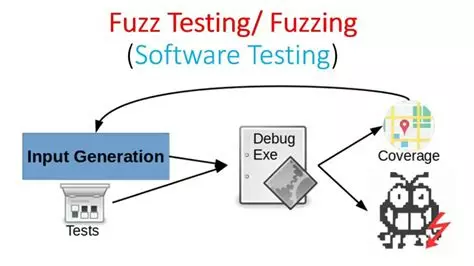
Principle of fuzz testing. (Source: cybermatters.info)
Introduction
In the development of industrial software, it is common to manipulate complex binary protocols, specific data formats. These components are traditionally validated using unit tests, an effective approach to verify expected and well-defined behaviors.
However, these tests quickly reach their limits when it comes to anticipating unexpected, incorrect or rarely encountered entries under normal conditions of use.
Fuzzing provides an answer to this problem by automating the generation of various and sometimes invalid inputs, in order to expose the software to a wide range of unforeseen situations and observe its behavior. Fuzzing does not aim to replace unit tests, but rather to complement them by exploring unexpected execution paths that are difficult to anticipate manually.
This article presents the fundamental principles of fuzzing, its general functioning, as well as a concrete case of application through the S2OPC project, based on the use of the OSS-Fuzz tool.
What is fuzzing ?
Fuzzing is an automated testing technique that involves generating and submitting random or malformed entries to a program to detect bugs, crashes or security vulnerabilities. Unlike conventional unit tests that verify expected behaviors, fuzzing explores borderline cases and unforeseen situations. Bugs typically detected by fuzzing include:
- Buffer overflows
- Uninitialized memory reads
- Memory leaks
- Divisions by zero
- Failed assertions
The fuzzing engine: LibFuzzer
Principe
LibFuzzer is an in-process, coverage-guided fuzzing engine integrated into the LLVM toolchain. Unlike black-box fuzzers, LibFuzzer executes the code under test within the same process as the fuzzing engine, enabling fast execution and fine-grained feedback.
LibFuzzer is designed to repeatedly execute a target function with automatically generated inputs and to observe the program’s behavior. Any abnormal behavior such as crashes, assertion failures or sanitizer reports is immediately detected and recorded. Because the fuzz target runs repeatedly during testing, it needs to be highly performant.
Coverage-guided fuzzing
LibFuzzer implements a variant of mutation-based fuzzing known as coverage-guided fuzzing, which has proven to be especially effective at discovering software defects.
In this approach, the code under test is instrumented to collect code coverage information during execution. Code coverage represents the set of instructions or basic blocks executed as a result of processing a specific input.
The fuzzing engine uses this coverage feedback to guide the generation of new inputs:
- inputs that exercise new code paths are considered interesting,
- these inputs are added to the corpus,
- further mutations are applied to them to explore deeper execution paths.
Architecture of a LibFuzzer-based fuzzer
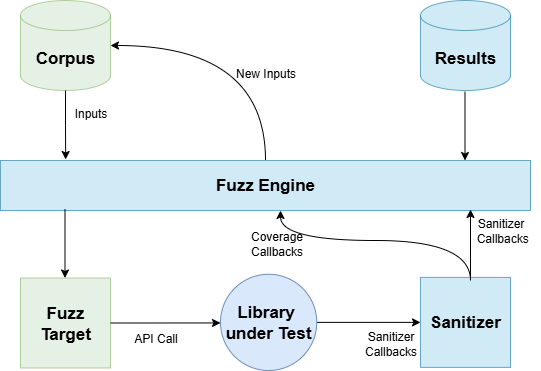
The diagram above illustrates the main components involved in a fuzzing setup based on LibFuzzer and their interactions.
The fuzzing process relies on the following elements:
-
Corpus: A collection of initial inputs used as a starting point for fuzzing. These inputs can be minimal samples or real-world data. As fuzzing progresses, the corpus evolves by incorporating inputs that lead to increased code coverage. Over time, the corpus converges towards a minimal set of inputs that maximizes code coverage.
-
Fuzzing engine: The core component responsible for mutating inputs, executing the fuzz target, collecting coverage feedback and deciding which inputs should be retained for further exploration.
-
Fuzz target: A user-defined entry point that receives the mutated inputs and forwards them to the code under test. It defines how raw input data is interpreted and exercised.
-
Library under test: The actual code being tested, such as a parser, protocol stack or decoding routine.
-
Sanitizers: Instrumentation tools (e.g. AddressSanitizer) that monitor program execution and detect abnormal conditions such as memory corruption, use-after-free or buffer overflows.
-
Results: When a crash or sanitizer violation is detected, LibFuzzer records the input responsible for the failure and generates diagnostic artifacts such as stack traces and logs.
Structure of a fuzz target
A fuzz target is the interface between LibFuzzer and the code under test. It defines how each generated input is consumed by the application or library.
Each LibFuzzer target must expose the following function:
int LLVMFuzzerTestOneinput(const uint8_t *data, size_t size){
   DoSomethingInterestingWithMyAPI(Data, Size);
   return 0; // values other than 0 and -1 are reserved for future use.
}
This function is invoked repeatedly by LibFuzzer with different inputs. The parameters represent:
-
data: a pointer to a buffer containing the fuzzed input,
-
size: the size of the input buffer in bytes.
Application of fuzzing to S2OPC: the decode_fuzzer case study
Overview
To validate the robustness of S2OPC’s binary decoding logic, a dedicated fuzz target named decode_fuzzer has been implemented.
Its purpose is to stress the decoding and encoding of OPC UA encodeable types when faced with malformed, truncated or unexpected binary inputs.
Rather than focusing on a single structure, the fuzzer dynamically selects encodeable types at runtime and applies a decode–encode–decode sequence to verify the internal consistency of the implementation.
The complete implementation of the fuzz target is available in the S2OPC source tree:
tests/ClientServer/unit_tests/fuzzing/fuzz_decode.c
Integration into OSS-Fuzz
OSS-Fuzz is Google’s continuous fuzzing service for open-source projects. It provides:
- 24/7 fuzzing on Google Cloud infrastructure
- Support for multiple fuzzing engines (LibFuzzer, AFL++, Honggfuzz)
- Integration with sanitizers (AddressSanitizer, MemorySanitizer, UndefinedBehaviorSanitizer)
- Automatic bug reporting and corpus management
- Code coverage reports
Integrating S2OPC into OSS-Fuzz requires defining a small set of configuration files located in the directory projects/s2opc/of the oss-fuzz repository (reference [4]).
projet.yaml
The project.yaml file describes the project metadata and specifies which sanitizers should be enabled during fuzzing.
This can be an example of projet.yaml
homepage: ""https://s2opc.com/"
language: c
primary_contact: "primary@example.com"
auto_cds:
   - "other@example.com"
main_repo: "https://gitlab.com/systerel/S2OPC"
sanitizers:
  - address       # Detects buffer overflows, use-after-free
  - undefined     # Detects divisions by zero, integer overflow
  - memory        # Detects uninitiliazed memory reads
This file allows OSS-Fuzz to identify the project, locate its source repository and determine which classes of defects should be targeted. Each sanitizer focuses on a specific category of bugs, providing complementary and comprehensive coverage.
Dockerfile
The Dockerfile defines the build environment used by OSS-Fuzz. It describes how to construct the Docker image in which the project and its fuzz targets are compiled. The build.sh script is executed inside this container. For most projects, the image remains relatively simple:
# Base image with clang toolchain
FROM gcr.io/oss-fuzz-base/base-builder

# Install required system dependencies
RUN apt-get update && apt-get install -y ...

# Clone the project sources
RUN it clone <git_url> <checkout_dir>

# Set working directory for the build
WORKDIR <checkout_dir>

# Copy build script and other fuzzer files in source directories
COPY build.sh fuzzer.cc $SRC/
In this configuration, the project source code is checked out into $SRC/<checkout_dir>.
build.sh
The build.sh script defines how the project and its fuzz targets are compiled. The script is executed within the image built from the Dockerfile.
In general, this script should do the following:
- Build the project using your build system with the correct compiler.
- Provide compiler flags as environment variables.
- Build your fuzz targets and link your project’s build with libFuzzer.
All resulting binaries must be placed in the $OUT directory.
The complete and functional example of the S2OPC configuration can be found in oss-fuzz/projects/s2opc/ after cloning the OSS-Fuzz repository (see reference [4]).
Execution with OSS-Fuzz
Once integrated into OSS-Fuzz, the fuzz target decode_fuzzeris built and executed continuously using Google’s infrastructure.
OSS-Fuzz:
-
compiles S2OPC with Clang and sanitizer instrumentation,
-
executes the fuzz target millions of times with mutated inputs,
-
tracks code coverage to guide input generation,
-
automatically reports crashes, sanitizer violations and memory errors.
For local experimentation, the same environment can be reproduced using OSS-Fuzz helper scripts, making it possible to debug findings before submission (see reference [3] or the README in tests/ClientServer/unit_tests/fuzzing/ for details).
Observed results
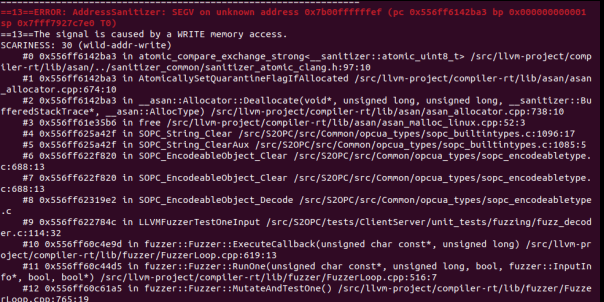
Running the decode_fuzzer target with OSS-Fuzz and AddressSanitizer (ASan) quickly led to the discovery of a critical memory error in the S2OPC decoding logic.
The figure below shows a typical crash report automatically generated by OSS-Fuzz during fuzzing execution.
The fuzzing process runs continuously and only stops when a crash or a sanitizer-detected error occurs. At that point, execution is interrupted and a detailed report is printed to the terminal, allowing developers to directly identify the faulty code path, trace the root cause of the issue, and apply an appropriate fix.
Conclusion
Fuzzing efficiently tests software against untrusted or malformed inputs, uncovering edge cases and hidden flaws missed by conventional methods. Combined with sanitizers, it enables precise, early detection of issues. When integrated into continuous testing, it greatly improves reliability and security. Fuzzing has thus become essential for modern, security-critical software.
Références
[1] https://llvm.org/docs/LibFuzzer.html
[2] https://fuchsia.dev/fuchsia-src/contribute/testing/fuzz_testing